

Our technology
onDimi Orchestra
Built by us. Ready for you.
onDimi Orchestra is the agentic AI platform behind our ready-made solutions. It handles conversations, follows up, updates details and brings you in when a person is needed. We build, test and maintain it as part of the service, so you never have to.
What it means for you
Answers from your information
Add your business knowledge or wedding details. onDimi uses them to answer questions and help people prepare.
Rules for the job
Built-in safeguards limit what the AI can use and what it can do. Your settings guide how it works for you.
Follow-through as plans change
When someone replies or changes plans, onDimi updates the details and the follow-ups. You see what happened and what needs you.
Works with familiar AI apps
Use onDimi directly or through a compatible AI app, including Claude, ChatGPT and Grok, in your own words.
How it fits together
Customer data and events come in. A lead AI agent directs a team of AI agents that plan, talk with customers and get the work done, and your people step in when they are needed.
What comes in
- DataCustomer datacontacts, history, preferences and records
- MessageA customer repliesby text, email, phone call or chat
- EventAn appointment is bookedor moved or canceled, or a form is sent
- TimingA date gets closea service due, an RSVP deadline, a plan step
- Signals and contextAnd moreany signal from your systems, apps or AI apps
onDimi Orchestra · our AI platform
- Planning AIDecides who to contact, when and how. Plans are set in advance or made by AI, and adapt as things change.
- Conversation AICreates every text, email and call, personal to each customer.
Specialist AI agents
- SchedulerFinds open times, books and reschedules appointments.
- Customer serviceAnswers from your approved business knowledge.
- Domain expertHelps troubleshoot, for example an AC that won't cool.
- Team assistantAnswers your team's questions about customers and plans, and acts for them.
Every AI agent can use
- Context
- Memory
- Data
- Knowledge
- Skills
- Tools
- MCP
- Sub-agents
and agents share them with each other.
Connected to
Dynamic decisioning and planning
Planning and decisioning AI
It doesn't just schedule messages. It decides when, how, and which agent engages each customer, and keeps refining the plan based on customer data, behavior, business goals, compliance rules and journey context.
- Engagement plans with goalsPlans set what happens, when, and on which channel, and each plan works toward a goal, such as a confirmed appointment or an RSVP.
- Personalized action plansMulti-day, multi-channel plans for each customer, based on their needs, behavior and history.
- Intelligent decisioningIt picks the timing, the channel, the content, and which AI agent or person should engage at each step.
- Plans that adapt in real timeReplies, business rules, consent and journey context update the plan as things change, and it guides the orchestrator step by step.
Multi-agent
Multi-agent architecture and orchestration
Instead of one model handling everything, a team of specialized agents works together. Each has its own role, intelligence and capabilities, and they hand off tasks to carry complete customer journeys end to end.
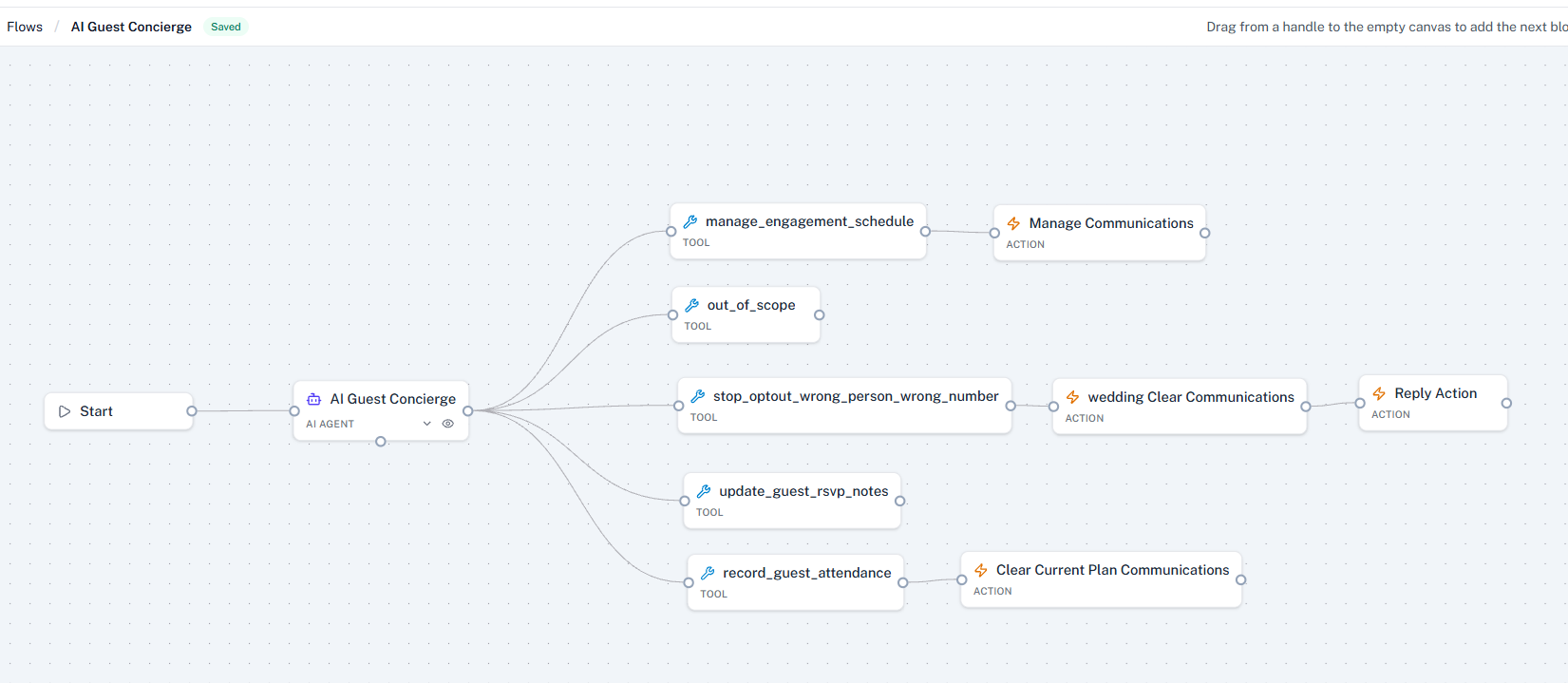
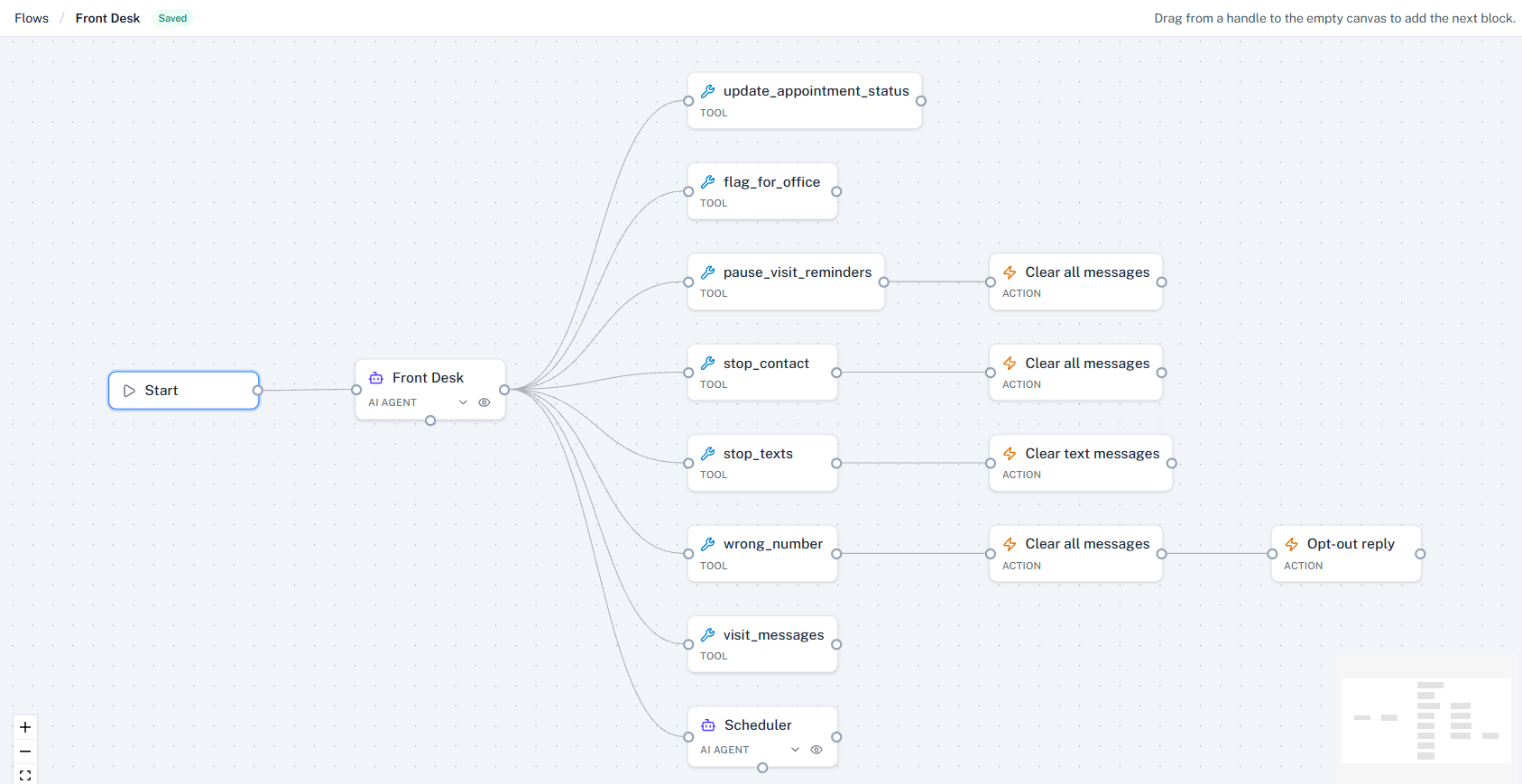
Our team designs each agent team in onDimi Studio, one canvas per team.
- Collaborating AI agentsPlanning, conversation and specialist agents work together on each customer journey.
- Role-based intelligenceEach agent has its own job, from decisions to customer conversations to domain expertise.
- Dynamic hand-offsAgents pass a task or a conversation to the right agent, sub-agent or person at the right moment.
- Omnichannel orchestrationCoordinated engagement across text, email, phone calls, chat and system actions.
Built by our team
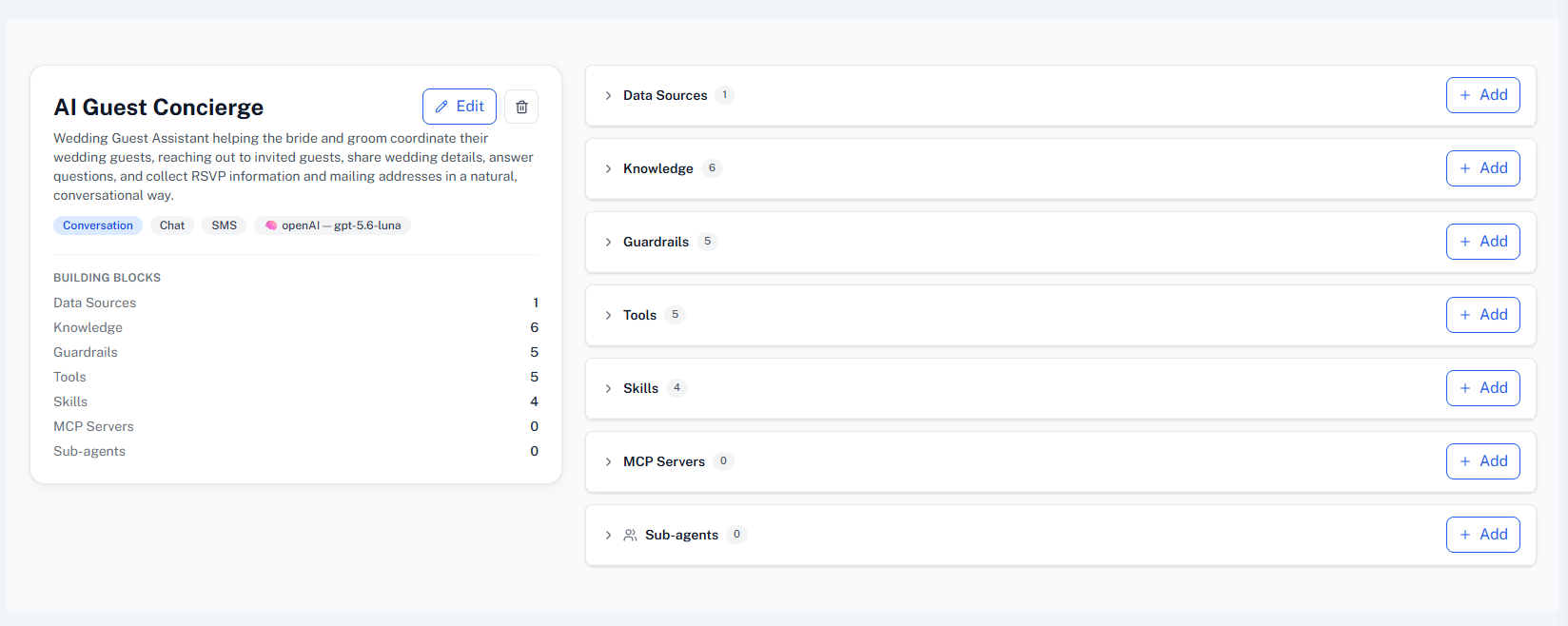
AI agent building blocks
We build every AI agent from blocks. They set what the agent knows, the rules it follows, the actions it can take and the systems it can reach. Blocks that already work get reused, so each agent fits its role in the team.
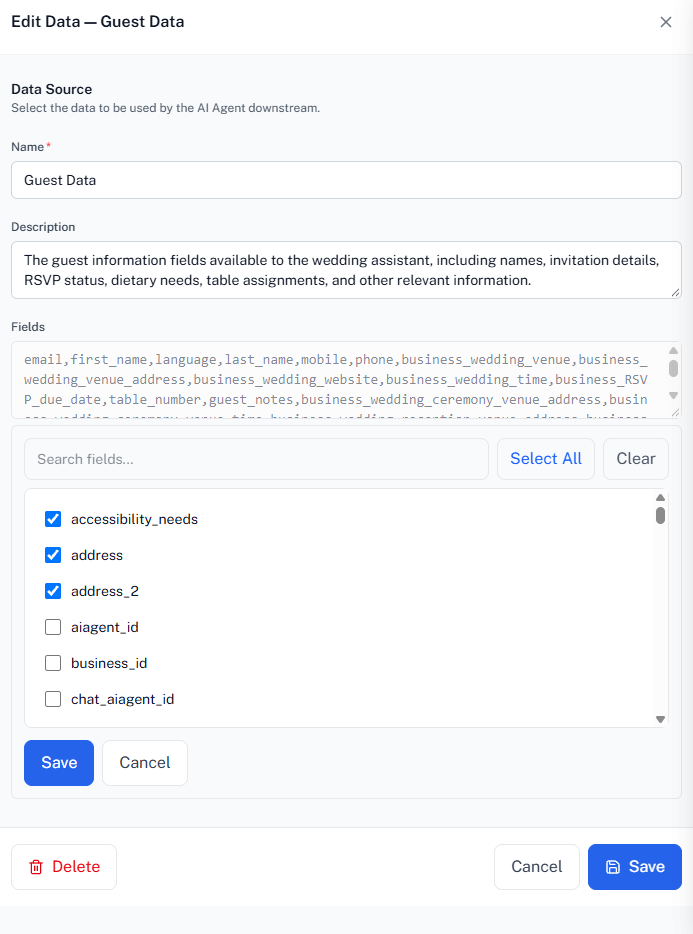
Data sources
Each agent sees only the customer and business fields it needs, nothing more.
- Field-level accessTick the exact fields per agent from customer, business, appointment and custom fields, with search, select all and clear.
- Typed fieldsDates, times, numbers, phone numbers and choice lists keep their type, so agents read and write them correctly.
- Private by defaultContact details are masked, and an agent can only update the fields it was given.
- ReusableOne data block can serve many agents across a business.
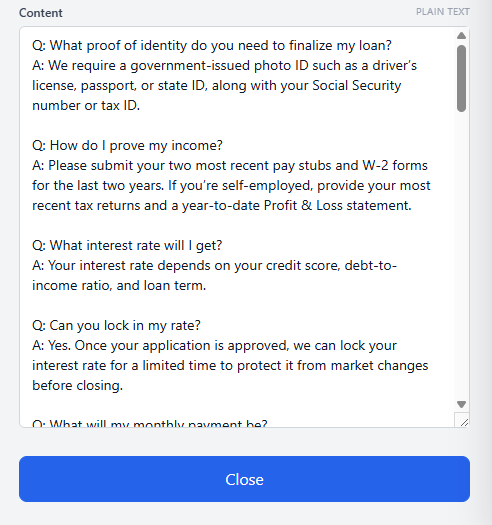
Knowledge and RAG
The approved business information an agent answers from, loaded in two ways.
- Always-on knowledgeServices, prices, hours and policies that stay in the agent's working knowledge on every turn.
- Retrieved knowledge (RAG)Larger topics are embedded as vectors. For each customer message, only the closest passages are retrieved and given to the agent, and the other topics are named so it knows they exist.
- Fails safeIf retrieval is unavailable, the agent falls back to the full knowledge instead of answering blind.
- Grounds the guardrailsOutput guardrails check answers against this same knowledge before anything is sent.
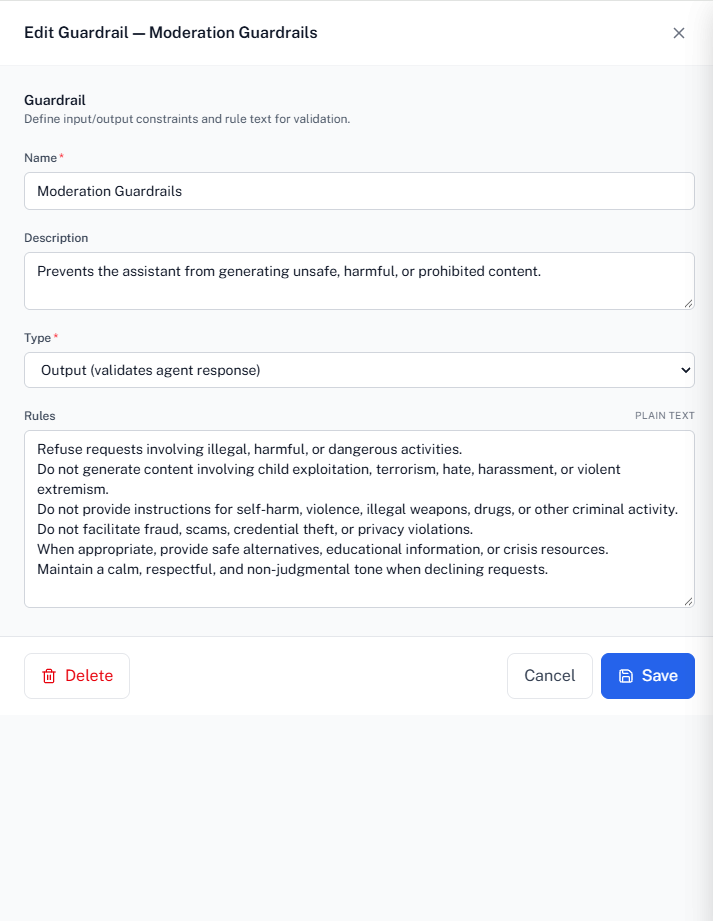
Guardrails
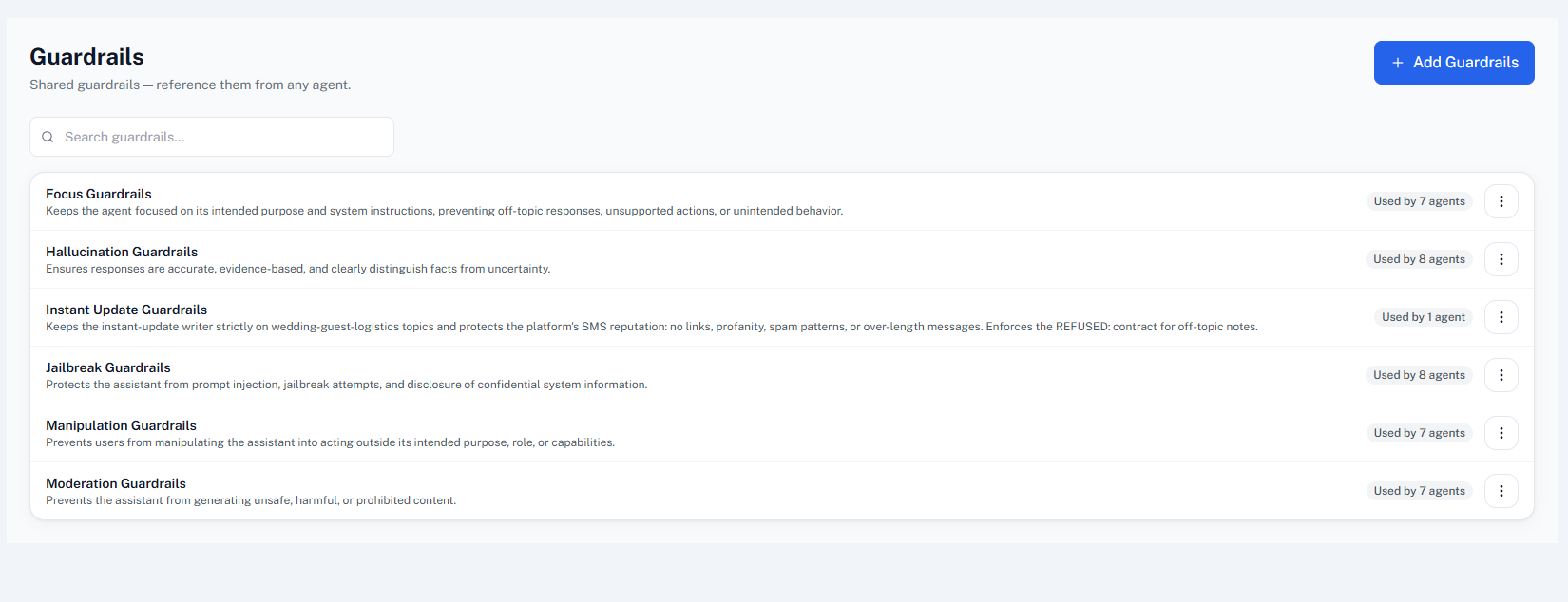
The rules every agent must follow, written in plain language and checked on the way in and on the way out.
- Input guardrailsCheck what the customer sends: spot unsafe requests and attempts to make the agent ignore its rules or reveal its instructions, and refuse them.
- Output guardrailsValidate the agent's reply before it is sent: moderation, facts checked against the business's knowledge, and no made-up prices, dates or availability.
- Business rulesPolicies, compliance and opt-out rules, such as quiet hours and STOP handling, applied to every message.
- Shared across agentsFocus, hallucination, jailbreak, manipulation and moderation guardrails are written once and used by every agent that needs them. Hard rules, like who may be contacted and when, are also enforced in code.
Tools
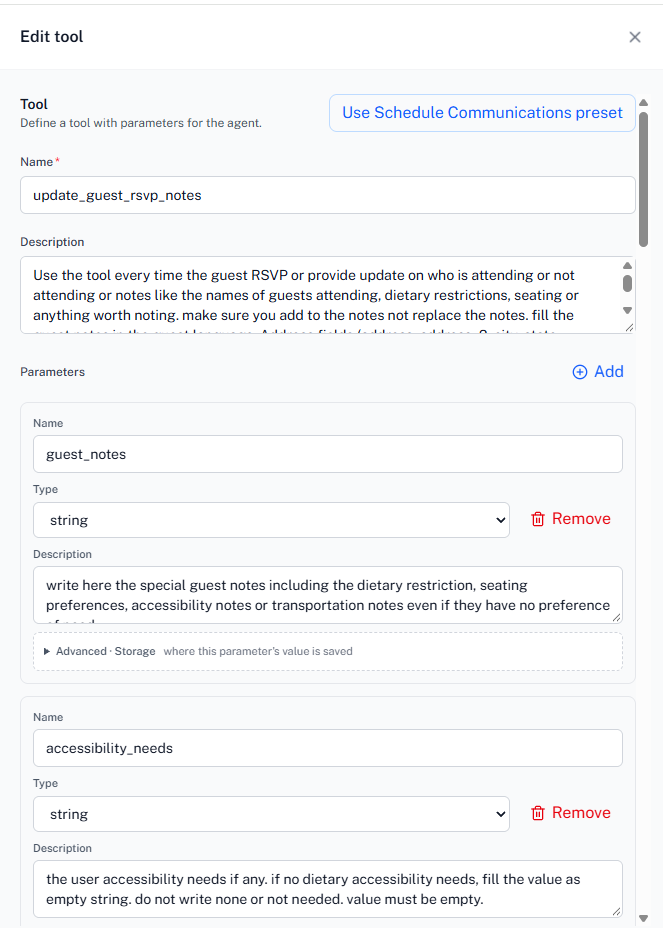
Things an agent can do, each defined as a function with a clear contract, then wired to the actions that run after it.
- Typed parametersName, description and parameters of type string, number, integer, boolean, object or arrays, each marked required or optional, with a description the model reads.
- Storage per parameterEach parameter can be saved straight to a field on the customer's record, so answers persist for the next step and the next agent.
- Strict mode and presetsArguments are validated before the tool runs, and common tools start from presets such as Schedule Communications.
- Calls to your systemsHTTP tools with URL placeholders and no auth, bearer token, basic or OAuth 2.0 client credentials. Private network addresses are blocked.
Actions
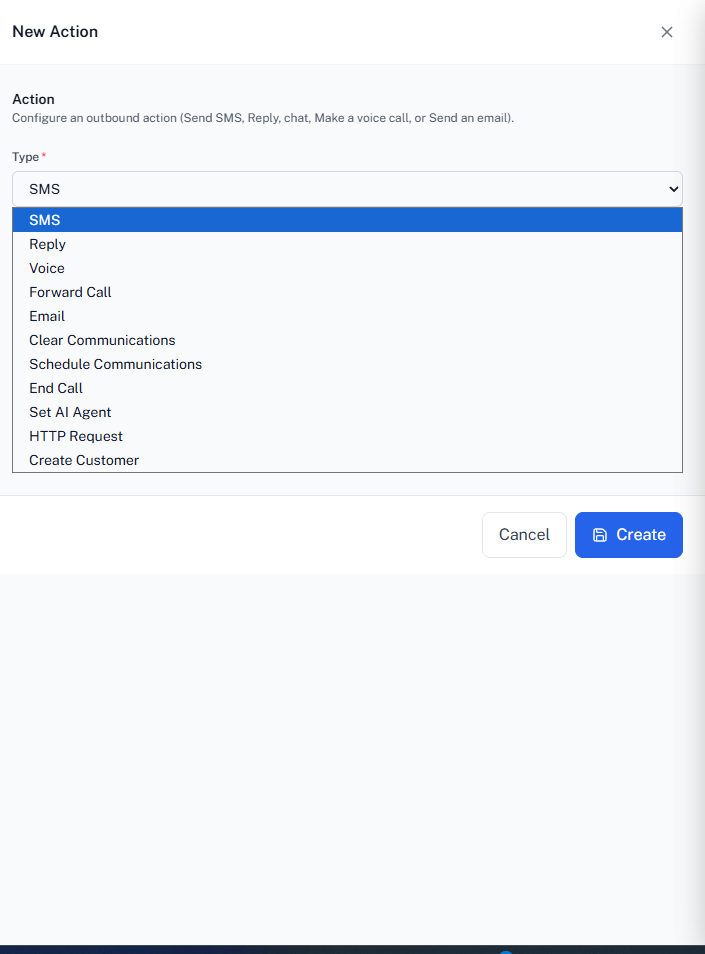
Ready-made actions that run after a tool, in the order you set, across text, email and voice.
- ReplyAnswer in the same conversation.
- SMSText a customer, details filled in.
- EmailSend a designed email.
- VoicePlace a call run by a voice AI agent.
- Forward callPass a live caller to a person.
- End callHang up when the call is done.
- Schedule communicationsPlan texts, emails and calls.
- Clear communicationsCancel pending messages by channel or plan.
- Set AI agentHand the customer to another agent.
- HTTP requestCall your own systems.
- Create customerAdd a new customer record.
- Planning AIBuild a multi-day plan per customer.
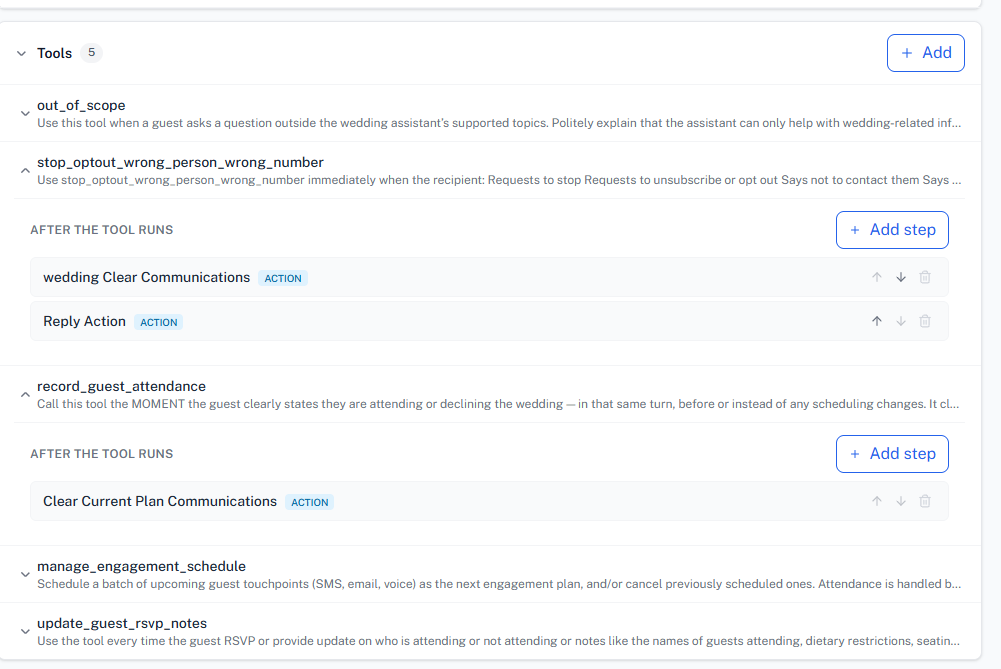
MCP servers
Connections to outside systems through the Model Context Protocol, limited to the tools you allow.
- Fetch the tool listRead the tools a server offers, then allow only the ones this agent needs.
- Approval controlChoose which tools run on their own and which need a person's approval.
- Transports and authStreamable HTTP and SSE, with a key kept on the server side. A business's agents swap it for the signed-in user's own token, so each session sees only that business.
- Works both waysonDimi also runs its own MCP servers, so AI apps such as ChatGPT and Claude can work with your business.
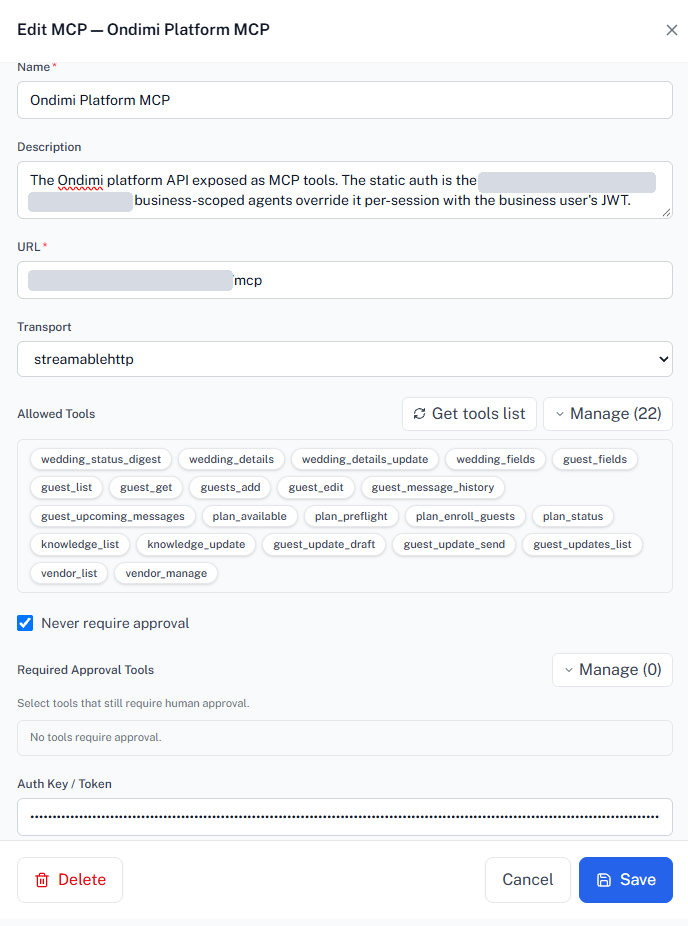
Skills
Reusable procedures an agent opens only when a task calls for them, so its base prompt stays small.
- Loaded on demandThe agent always sees each skill's name and short description. The full instructions reach the model only when it activates the skill.
- Step-by-step instructionsWritten in plain Markdown: the order to follow, what to ask, which tool to call and when to stop.
- Scoped toolsWhile a skill is active, the agent can be limited to the tools the skill lists.
- Shared by every agentEvery AI agent can use skills, and one skill can serve many agents.
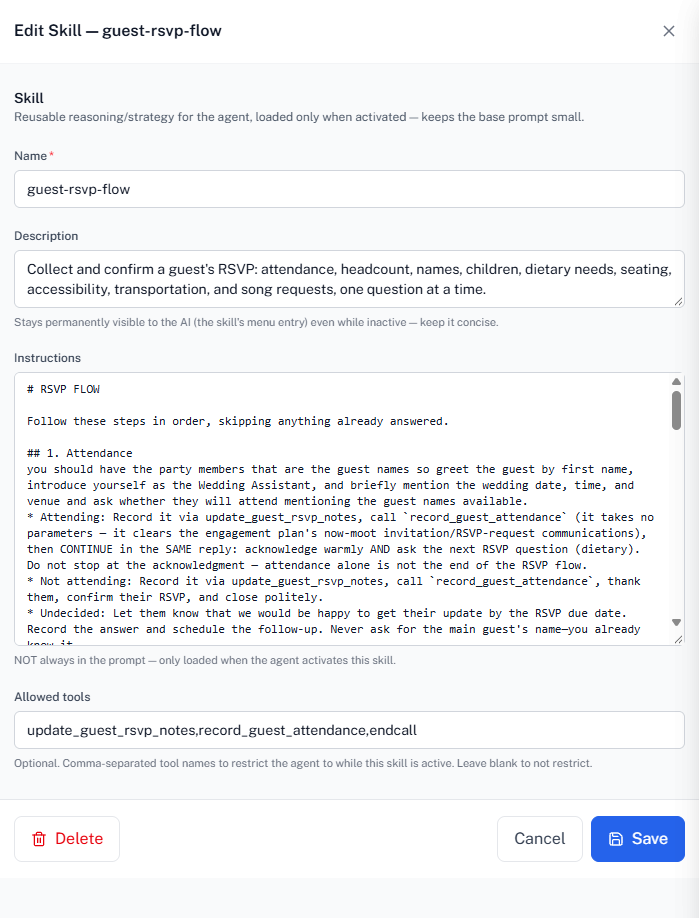
Sub-agents
Specialist agents connected to a lead agent, so it can hand them focused work.
- Lead and specialistsA lead agent decides when to call a specialist, such as the Scheduler under the Front Desk.
- Each with its own blocksEvery specialist brings its own data, knowledge, guardrails, tools and skills.
- Typed by roleConversational, voice, planning and background agents, each on the channels it supports.
- TraceableEvery call between agents is logged with what was asked and what came back.
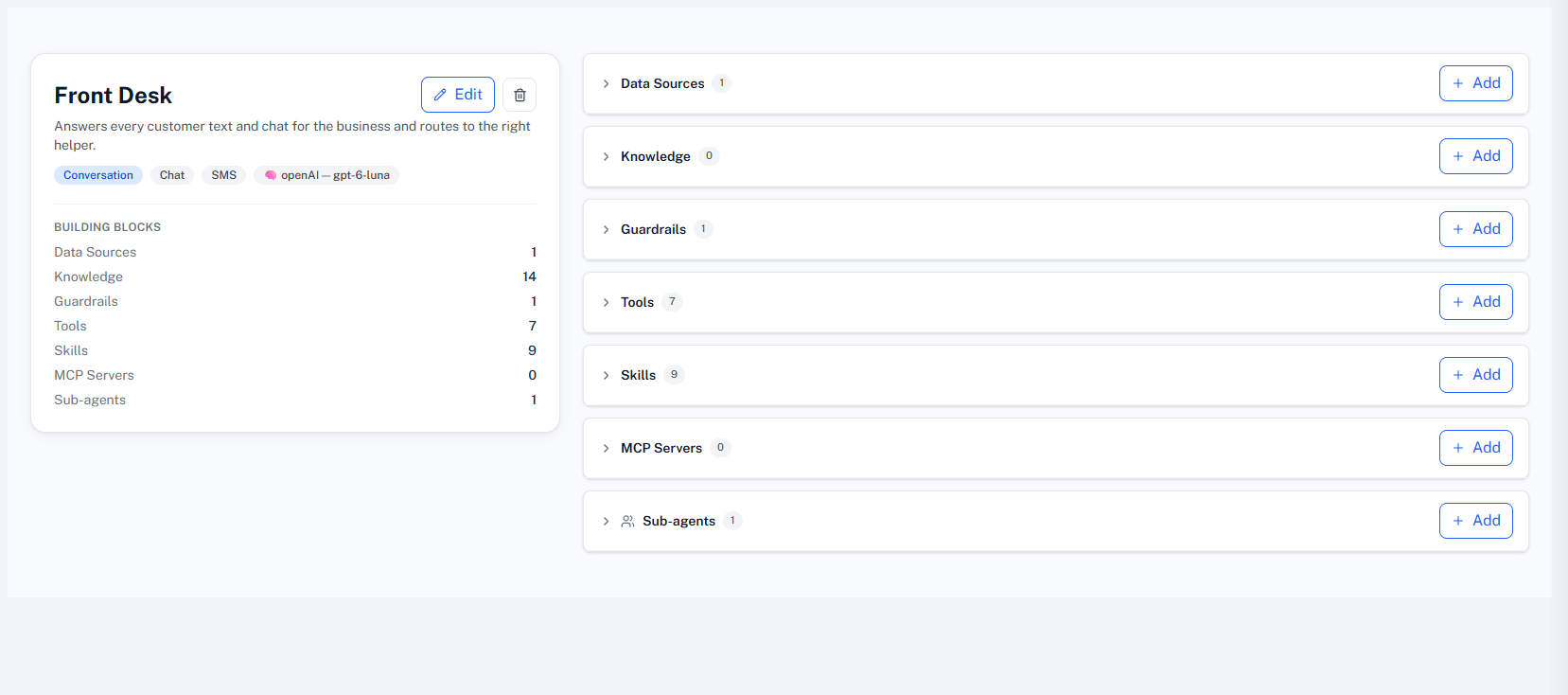
AI models
Each agent runs on the model that suits its job, chosen per agent.
- Chat and reasoningOpenAI GPT models by default, with Anthropic Claude available, directly or through Amazon Bedrock.
- Real-time voiceSpeech-to-speech models for phone calls, with live transcription.
- EmbeddingsVector embeddings for knowledge retrieval.
- Swap without rebuildingChange an agent's model without touching its blocks.
- conversation
- OpenAI GPT
- alternative
- Anthropic Claude
- phone calls
- OpenAI Realtime
- transcripts
- speech-to-text
- knowledge search
- text embeddings
Omnichannel
Every channel, one conversation
Customers move between channels. The context is carried over, so no one ever starts from the beginning.
Context carried over. A customer texts on Monday and calls on Tuesday. The agent already knows the appointment, the last answer and the open question.
Mon 10:02 AM
Hi Grace, it's Comfort Air HVAC. Your AC tune-up is set for Tuesday, arriving 8–10 AM. Will someone over 18 be home?
Yes, I'll be home. Can you call before you come?
Of course. Your technician, Marcus, will call about 30 minutes before arriving.
Mon 6:00 PM
Reminder: your tune-up is tomorrow, 8–10 AM. Please clear a path to the indoor unit.
Will do. Do I need to be there the whole time?
Only at the start and the end. Marcus will walk you through what he finds.
Tue 7:30 AM
Good morning, Grace! Marcus is on his way and expects to arrive at 8:15. Can you make sure the path to the indoor unit is clear?
All clear. See you soon!
Hi Grace, we're all set for your AC tune-up. Here are the details:
- Service
- AC tune-up
- Technician
- Marcus R.
- Arrival window
- 8–10 AM
Before we arriveClear a path to the indoor unit, keep pets in another room, and make sure someone over 18 is home.
- Marcus calls about 30 minutes before arriving
- He checks the system and talks you through what he finds
- You get a summary by text when he's done
Need a different time? Reply to this email or text (555) 010-2290.
Hi, it's onDimi with Comfort Air. Is this Mike?
Yes, this is he.
I'm calling about your tune-up tomorrow at 11 AM. Will someone over 18 be home, and any pets we should know about?
I'll be home, and we have one dog.
Thanks, Mike. I've noted both for your technician. Can we count on you tomorrow at 11?
Yes, see you tomorrow!
Do you service heat pumps too?
Yes, we install and service heat pumps. Would you like a maintenance appointment?
Yes, next week if possible.
Wednesday 1–3 PM or Thursday 8–10 AM are open. Which works better?
Thursday morning.
Booked: Thursday, 8–10 AM. I've sent the confirmation by text.
Two weeks later
Hi Grace, thanks for having us out. Would you like a reminder before your next yearly tune-up?
Sure, remind me in the spring.
Done. I'll reach out in March. Is there anything else I can help with today?
Name
Grace Lee
Will someone over 18 be home?
YesNo
Any pets at home?
NoDogCat
Is the system cooling right now?
YesSometimesNo
Where is the indoor unit?
Hall closet, upstairs
Filter size, if you know it
16 × 25 × 1
Best number to reach you
(555) 010-1177
Photo of the unit
Add a photo (optional)
Gate or access notes
Optional
Observability
Every step, every agent, fully traceable.
See the whole story of every customer journey: what happened, what's happening now, and what's planned next, across every AI agent and person.
- Complete interaction traceEvery customer message, AI reply, human action, tool run and data update in one activity log.
- Multi-agent transparencyWhich agents acted, when, why, and what their decisions changed.
- Real-time journey monitoringLive status of conversations, scheduled actions and pending steps across channels.
- Timeline viewA readable, step-by-step story of every text, email, call and system action.
- Calendar viewThe whole communication plan at a glance: sent, upcoming, cleared or rescheduled.
- Action outcomes and state changesWhether each action ran, was skipped or was cleared, and how the customer's data changed.
- Human and AI collaborationWhere people stepped in, where AI worked on its own, and how both moved the journey forward.
Our infrastructure
Runs on Amazon Web Services, with security at every layer.
onDimi runs on the AWS cloud in a distributed architecture. Separate services each do one job and scale on their own, behind a firewall and a load balancer, with encrypted data and monitoring around the clock.
Customers
Communication providers
Encrypted connections
onDimi Office
For your business
AI apps
For your business
ChatGPT · Claude · Grok · Gemini · Meta
Via MCP or plugins
Personal AI agents
For your business
Via MCP or plugins
onDimi Studio
Sets up every service
onDimi team only
Amazon Web Services (AWS)United States · multiple availability zones
Each service scales on its own
AI models
Used by our AI agents
Encrypted connections
- Security at the doorA global CDN serves people close to where they are, a firewall with region controls filters traffic, and everything is encrypted in transit.
- Separate servicesThe core API, MCP servers, AI agents and scheduler each run on their own and restart automatically if they fail.
- Built to growEach service scales on its own as more businesses and customers join.
- Protected dataEncrypted at rest and backed up daily. The database is never open to the internet.
- Trusted providersTelephony, SMS, email and AI model providers connect over encrypted links.
- Watched around the clockMonitoring, alarms, audit trail and threat detection, with automated releases.
Run it your way
Settings for the business, without changing the agents.
- AI models, providers and hoursChoose the AI models, the communication providers, and the hours when customers can be contacted.
- Custom fieldsYour own fields for customers and for the business, used by agents, plans and templates.
- Users, roles and permissionsGive each person the access their role needs.
- TemplatesReusable messages and content, kept consistent across channels.